
There are now two ways to run Claude Code work in parallel, and they are easy to confuse. Subagents live inside one session and report a result back. Agent teams are separate Claude Code instances that share a task list and message each other directly.
Anthropic ships agent teams as experimental: disabled by default, and meaningfully more expensive in tokens. For a solo developer running parallel sessions, that cost is the whole decision. This post covers what it actually does, what changed in recent versions, and when the extra cost is justified.
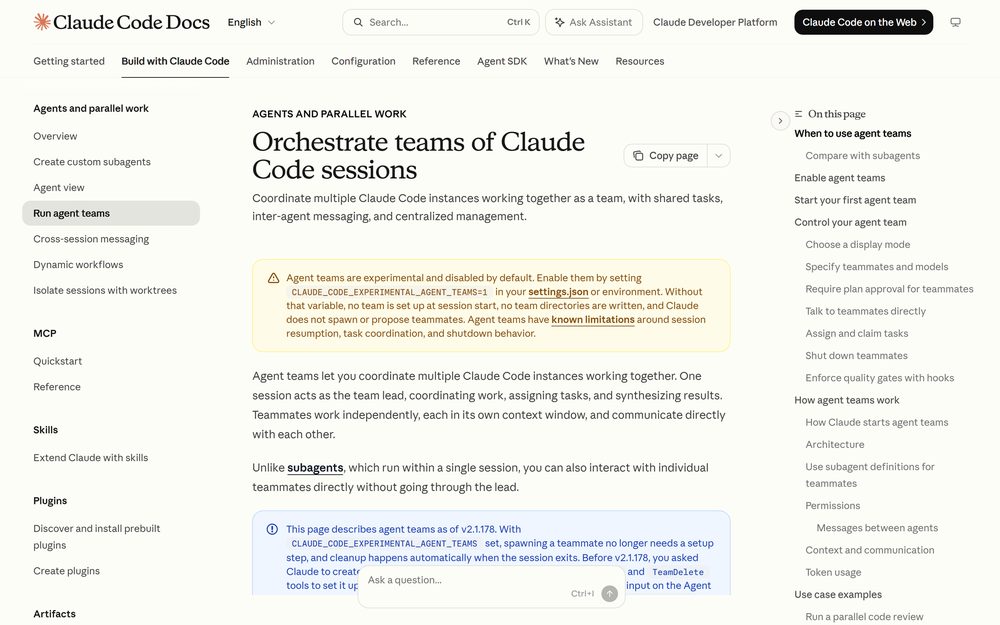
It is off unless you turn it on
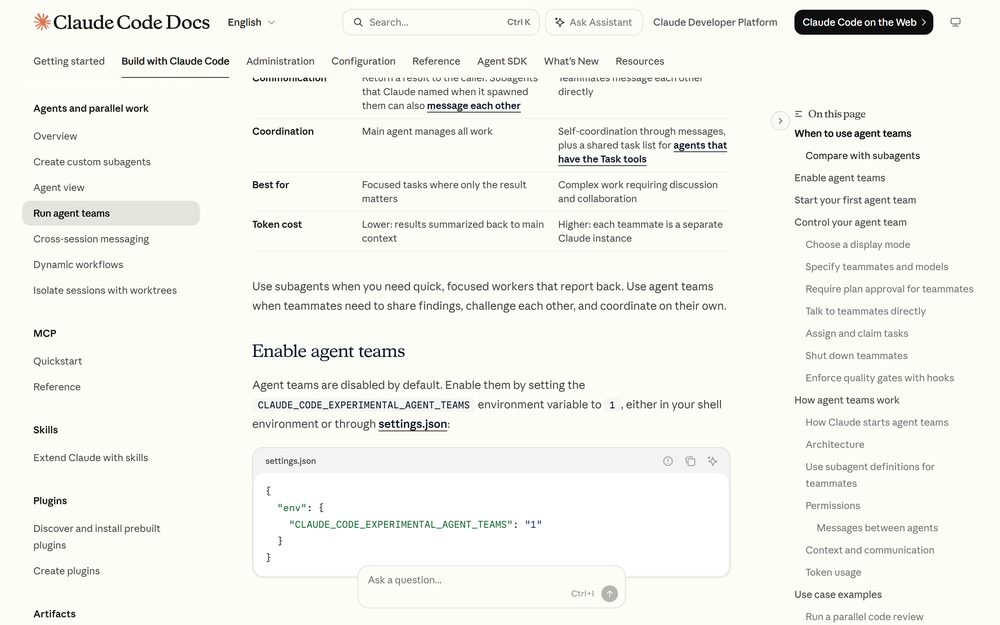
Agent teams do nothing until you set an environment variable:
{
  "env": {
    "CLAUDE_CODE_EXPERIMENTAL_AGENT_TEAMS": "1"
  }
}
Without it, no team is set up at session start, no team directories are written, and Claude does not spawn or propose teammates. That is worth knowing before you spend an afternoon wondering why “spawn three teammates” produced ordinary subagents.
Spawning teammates also requires an interactive session. In non-interactive mode with -p, including Agent SDK sessions, Claude does not spawn teammates, and a subagent Claude names runs as an ordinary subagent even with the flag on.
The v2.1.178 change most guides are still wrong about
Older write-ups tell you to ask Claude to create and name a team first, using the TeamCreate and TeamDelete tools. Both tools no longer exist.
As of v2.1.178, with the experimental flag set:
- spawning a teammate needs no setup step
- cleanup happens automatically when the session exits
- the
team_nameinput on the Agent tool is accepted but ignored - the
team_namefield inTaskCreated,TaskCompleted, andTeammateIdlehook payloads carries a session-derived name and is deprecated
There is a second, subtler consequence of enabling the flag. Claude names subagents on its own so it can message them later, and while agent teams are enabled, a named subagent launches as a teammate. Teams can form when you never asked for one. If an orchestration flow of yours waits on a subagent’s returned result, it can stall — because a teammate’s idle notification reports that it stopped, without its output.
Setting the variable back to 0 fixes that, and you do not need a new session: Claude Code reapplies settings-file env values when you save, and rereads the variable each time it spawns a subagent.
Teams versus subagents, honestly
| Subagents | Agent teams | |
|---|---|---|
| Context | Own context window; result returns to caller | Own context window; fully independent |
| Communication | Return a result to the caller | Teammates message each other directly |
| Coordination | Main agent manages all work | Self-coordination plus a shared task list |
| Best for | Focused tasks where only the result matters | Work requiring discussion and disagreement |
| Token cost | Lower — results summarized back | Higher — each teammate is a separate instance |
The documentation is blunt about the tradeoff: agent teams “add coordination overhead and use significantly more tokens than a single session.” For sequential tasks, same-file edits, or work with many dependencies, a single session or subagents are more effective.
Where teams genuinely win is disagreement. The documented example that makes this concrete is competing-hypothesis debugging:
Users report the app exits after one message instead of staying connected.
Spawn 5 agent teammates to investigate different hypotheses. Have them talk to
each other to try to disprove each other's theories, like a scientific
debate. Update the findings doc with whatever consensus emerges.
A single agent finds one plausible explanation and stops looking. Sequential investigation anchors on whatever was explored first. Several investigators actively trying to falsify each other produce a surviving theory that is much more likely to be the real root cause.
What is actually on disk
A team is four parts: a team lead (your main session), teammates, a task list, and a mailbox.
Each agent’s mailbox is a JSON file at ~/.claude/teams/{team-name}/inboxes/{agent-name}.json. Claude Code validates every entry when it reads the file; entries that do not match the message format are reported as errors and removed, and the valid messages are still delivered.
The team name is derived from the session: session- followed by the first eight characters of the session ID.
- Team config:
~/.claude/teams/{team-name}/config.json— removed when the session ends - Task list:
~/.claude/tasks/{team-name}/— persists locally, never uploaded, so resumed sessions keep their tasks
The config holds runtime state such as session IDs and tmux pane IDs. Do not hand-edit or pre-author it; your changes are overwritten on the next state update. And there is no project-level equivalent — a .claude/teams/teams.json in your project is treated as an ordinary file, not configuration.
One detail that matters for reliability: a message counts as sent only when the write to the recipient’s mailbox succeeds. If the write fails, the sending agent gets an error and nothing is sent.
Display modes, and why your panes stopped splitting
Two display modes exist. In-process runs every teammate inside your main terminal and works anywhere. Split panes gives each teammate its own pane and requires tmux or iTerm2 with the it2 CLI.
The default is "in-process". Before v2.1.179 it was "auto", which is why upgraded sessions that used to open split panes now stay in one terminal. Override it in ~/.claude/settings.json:
{
  "teammateMode": "auto"
}
Or per session with the experimental --teammate-mode auto flag, which does not appear in claude --help. Note that split-pane mode is not supported in VS Code’s integrated terminal, Windows Terminal, or Ghostty.
In in-process mode the agent panel sits below the prompt input: up and down arrows select a teammate, Enter opens its transcript so you can message it directly, Escape interrupts its turn, and x stops it.
Models, effort, and the settings that got removed
Claude runs each teammate on the lead’s current model unless your prompt names one or CLAUDE_CODE_SUBAGENT_MODEL is set. teammateDefaultModel was removed in v2.1.234 and a leftover value is ignored.
A teammate’s model and fast mode are fixed at spawn, so /model and /fast only change the lead’s settings — as of v2.1.199 typing either while viewing a teammate shows a notice saying so. /effort still applies to the viewed teammate’s later turns, because teammates follow the lead’s effort level.
Teammates start with the lead’s permission settings, including --dangerously-skip-permissions. You can change an individual teammate’s mode after spawning, but not at spawn time.
The security rule worth reading twice
When one agent messages another over SendMessage, Claude Code tells the receiving agent the message came from another Claude session, not from you. A teammate cannot approve a permission prompt or supply consent on your behalf, and a teammate that was denied an action cannot relay it to another teammate to get around the check.
In auto mode the classifier goes further: it treats a relayed approval claim as untrusted input, and it reviews every message — plain text or structured protocol message — before delivery. A message it blocks never reaches the recipient.
Quality gates you can enforce
Three hooks exist specifically for team work, and all three block on exit code 2:
TeammateIdle— runs when a teammate is about to go idle. Exit 2 sends feedback and keeps it working.TaskCreated— exit 2 prevents creation and sends feedback.TaskCompleted— exit 2 prevents the task being marked complete and sends feedback.
That last one is the useful one. “Tests must pass before a task can be closed” stops being a preference and becomes a rule.
Sizing, and the limits you will hit
Start with 3 to 5 teammates. Token costs scale linearly, coordination overhead grows, and returns diminish. If you have 15 independent tasks, three teammates is a good starting point — three focused teammates often outperform five scattered ones.
The documented limitations are worth knowing before you commit:
- No session resumption with in-process teammates:
/resumeand/rewinddo not restore them, and the lead may try to message teammates that no longer exist. - Task status can lag: teammates sometimes fail to mark tasks complete, which blocks dependents.
- One team per session, and no nested teams — teammates cannot spawn their own teammates.
- Lead is fixed for the session’s lifetime; you cannot promote a teammate.
One more cost detail that is easy to miss: an in-process teammate’s requests fall outside the main conversation’s cache TTL bucket, so its cache holds for five minutes by default. Set subagentPromptCacheTtl to 1h to keep it longer — the API bills one-hour cache writes at a higher rate.
The practical takeaway
Turn agent teams on when the work has genuinely independent lanes and the teammates need to argue: parallel code review with distinct lenses, competing-hypothesis debugging, cross-layer features where each layer has an owner.
Leave them off for everything else. Subagents already give you isolated context at a fraction of the token cost, and with the flag on, a named subagent quietly becomes a teammate — which changes how results reach you.