
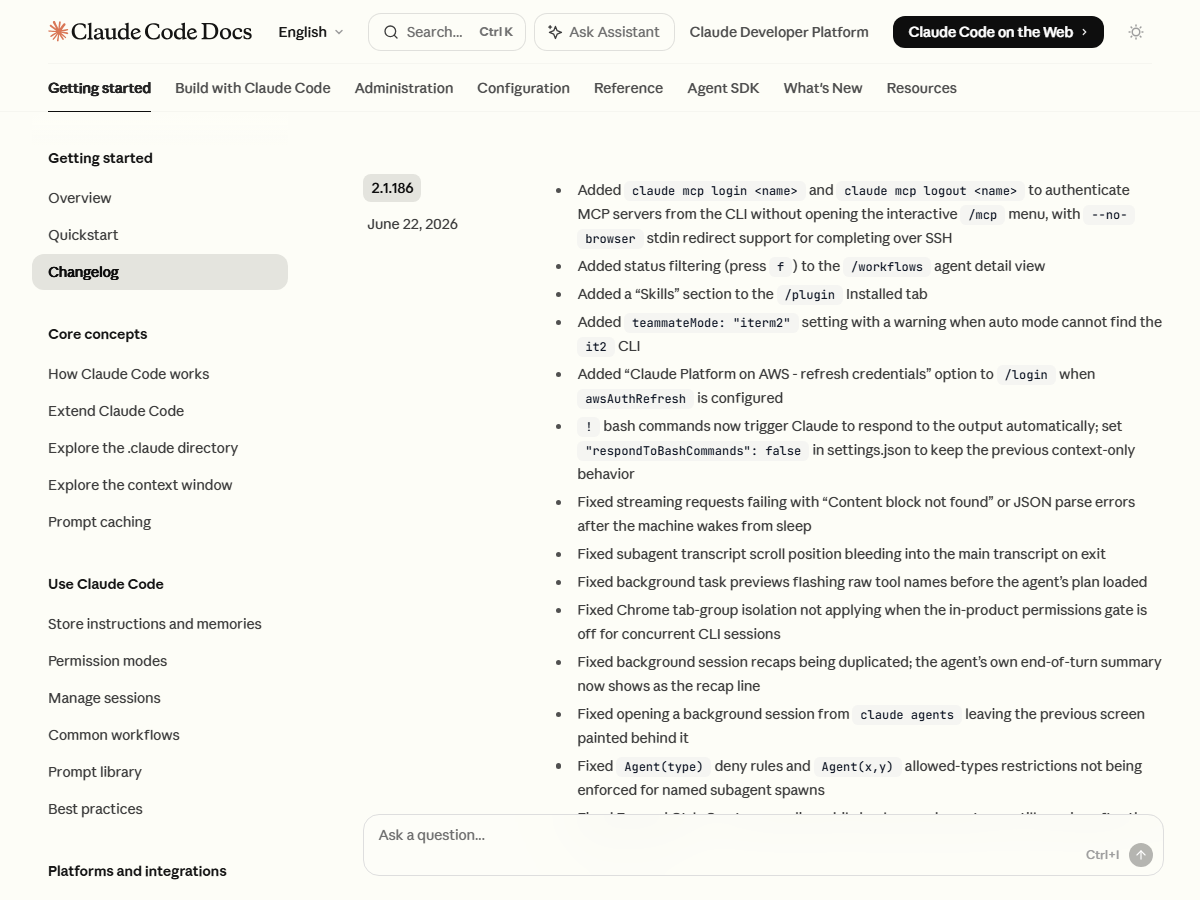
In short: Starting with Claude Code v2.1.186 (June 22, 2026), Claude automatically reacts to the output of any Bash command you run with
!. Before, that output only landed in the conversation context and stopped there; now Claude reads the result and answers right away. If you don’t want that, addrespondToBashCommandsset to false in settings.json to restore the old behavior.
While reading the Claude Code v2.1.186 changelog that shipped on June 22, 2026, I noticed a small but very tangible change in behavior. When you run a terminal command by prefixing it with !, Claude now reacts to that output on its own. Until now, a ! command simply parked its result in the conversation context and that was it; now Claude reads that result directly and adds a comment of its own.
It may sound like nothing, but for anyone who uses ! a lot, the flow changes quite a bit. I run NABERAL as a one-person operation, so I’m constantly firing off validation scripts and build commands with !. Before, I had to read that output again myself and ask “what does this mean?” — but after this update, that one step is gone. Convenient as it is, it can also get in the way depending on the situation, so it felt worth documenting how to switch it on and off as well.
This post isn’t a beginner’s install guide; it focuses on how a developer who already uses Claude Code should understand and handle this new behavior. I’ll go through what the ! command originally was, exactly what changed this time, when it earns its keep in practice and when you’re better off turning it off, and how to revert it in settings.json — in that order.
What the ! Bash command originally did
Summary: In Claude Code, putting
!at the very start of a line means that line is not a message to Claude but a Bash command to run in the terminal. The result is printed on screen and, at the same time, stored in the conversation context. Before v2.1.186, that was the end of it. The result stayed only as background information for your next question, and Claude wouldn’t react to it first.
When you work in Claude Code, there are moments where you want to slip a quick terminal command into the middle of a conversation. In that case, adding a single exclamation mark, !, at the start of the line makes that line run as a shell command instead of as a message to Claude. Type something like !npm test, for example, and the tests run with the results printed right there on screen.
The important point here is that this output isn’t just printed and gone. The result is also folded into the current conversation’s context. So after running a command, you could ask “summarize that result for me,” and Claude could answer by referring to that output. Not having to copy and paste command results one by one was the original strength of !.
The old approach did have one distinctive trait, though: the output went in strictly as ‘background information.’ Even if I ran a build with !, Claude wouldn’t speak up about the result first. Only when I asked the next question did it draw on that context. In other words, even with the result in hand, interpreting it took one extra action on my part.
This structure isn’t a bad thing in itself. When you want to quietly run several commands and ask about them all at once at the end, this approach is actually cleaner. And that is exactly the part this update changed, so nailing down the original behavior first helps everything else make sense.
Exactly what changed in v2.1.186
Summary: Starting with v2.1.186 on June 22, 2026, the output of a
!Bash command triggers an automatic response from Claude. That is, running the command makes Claude read the output and react immediately, with no separate question needed. The official changelog says that to turn this off, you setrespondToBashCommandsto false in settings.json.
The core of it fits in one sentence: run a ! Bash command now, and Claude automatically responds to the output. Quoting the official changelog verbatim: “! bash commands now trigger Claude to respond to the output automatically.”
Compared with before, the difference is clear. Previously I had to run !npm test and then ask “how did it go?”; now, just running the command makes Claude read that output and offer a first comment. If a test failed, it points out where it broke; if the build log threw a warning, it explains what that means — before I even ask. Checking the result and reacting to it now happen in one continuous motion.
I ran a short script through ! myself right after updating. The moment I typed the command, the output appeared, and Claude’s reaction to that output naturally followed — I could confirm that flow directly. With one step removed, it clearly took less effort.
It’s worth pinning down the version numbers precisely here. This behavior was added in v2.1.186, and as of the official changelog the most recent version is v2.1.187 (June 23, 2026). One more thing: within the changelog, the respondToBashCommands setting is mentioned in this v2.1.186 entry alone. In other words, this setting is the opt-out switch that first appeared alongside this very update. A tool’s behavior can change from version to version, so when you actually apply this, it’s safer to re-check the official changelog as of the moment you’re using it.
When it earns its keep in practice
Summary: Auto-response shines most on commands whose output you have to interpret right away — tests, builds, linting. The instant you run the command it flags the cause of a failure or the meaning of a warning, so the extra step of asking about the result disappears. Conversely, when you want to quietly stack up several commands and ask about them all at once at the end, it can get in the way.
The scene where auto-response is most useful is work where you have to interpret a command’s output immediately. Running tests is the classic example. Run a test with !, and as soon as the result appears, Claude tells you which case failed and what most likely caused it, up front. The step where I used to re-read the failure log and ask “why did this break?” simply falls away.
Build output is similar. After a long build, warnings and errors come out jumbled together, and picking out just the essentials from that is more of a chore than it sounds. With auto-response on, it immediately organizes the parts of that long output that deserve your attention. It’s useful across the whole class of commands where you ‘decide your next move based on the output’ — lint results, package-install logs, and so on.
Seen through my solo operation, the reason this change is welcome is simple. When you work alone, what you most begrudge isn’t the main task but the small handling between tasks. When the short loop of running a command, reading the result, and typing another question shrinks by one step thanks to auto-response, the flow breaks that much less. Small as it is — shaving a single step off one command — enough of these add up to become one piece of workflow automation.
To be honest, though, it isn’t always pure upside. Say you toss a long-running command out almost like a background job, go do other work, and want to review everything at once later — the response that tags along every time can feel like it breaks your flow. When even a light command that just lists files or peeks at a path draws a reaction, it can get tedious. So this behavior is less ‘the right answer you always leave on’ and more an option you switch on and off to match the nature of the task.
How to turn it off when you don’t want it — the settings.json option
Summary: To turn auto-response off, add
"respondToBashCommands": falseto settings.json. This returns you to the old behavior, where a!command’s output still goes into the conversation context but Claude doesn’t react to it first. It’s the official opt-out method the changelog points to.
Turning it off is simple. Open settings.json, the Claude Code settings file, and set the respondToBashCommands entry to false. In JSON, it looks like this.
{
  "respondToBashCommands": false
}
If your settings.json already contains other settings, just add this one line among the existing entries. For example, it would look like this.
{
  "theme": "dark",
  "respondToBashCommands": false
}
With this value set to false, a ! command’s output is still saved into the conversation context as before, but Claude won’t look at that output and react first. In other words, it returns exactly to the pre-v2.1.186 ‘hold it in context only’ behavior. If you prefer the flow of quietly stacking commands and asking about them all at once at the end, this setting preserves that.
Just keep two things in mind when applying the setting. First, follow JSON syntax. Miss a comma between entries or close a quote incorrectly, and the entire settings file can be ignored. Second, spell the setting key exactly. A mixed-case name like respondToBashCommands won’t be recognized if even one character is off. When I first started editing settings, I once eyeballed a key name, it didn’t take, and I stared at it for a long while. Run a ! command once more after configuring, and you can immediately confirm whether auto-response is gone.
A quick preparation and review checklist
Summary: To handle this behavior well, first confirm your Claude Code version is v2.1.186 or higher, recall which tasks you use
!for most, then gauge over a few days of use whether auto-response helps or annoys. If it annoys, turn it off in settings.json; the single deciding criterion — ‘does my workflow get smoother’ — is enough.
Finally, here are the items worth reviewing right now around this new behavior.
- Check the version first. Auto-response was added in v2.1.186. If your Claude Code is older than that, the behavior doesn’t exist at all, so check your version first and update to the latest if needed. As of the official changelog, the most recent version is v2.1.187.
- Recall where you use
!. Jot down what you usually run with!. If a lot of it is commands where interpreting the result matters — tests, builds, linting — auto-response is likely to help. If most of it is light check commands, turning it off may be the cleaner choice. - Use it for a few days, then decide. Work with it on for a few days and feel for yourself whether the trailing response smooths your flow or breaks it. Rather than vaguely leaving it on ‘because it’s a new feature,’ it’s better to decide by your own experience. If it bothers you, set
respondToBashCommandsto false in settings.json as described above.
When dealing with a tool’s new behavior, one criterion is always enough: “Does this change actually make my workflow smoother?” If auto-response does, leave it on; if not, turn it off. That the on/off switch shipped alongside it from the start was, if anything, the part of this update I liked most.
Wrapping up
Starting with Claude Code v2.1.186 on June 22, 2026, Claude automatically reacts to the output of a Bash command run with !. Where the result used to land only in the conversation context, now Claude reads it and adds a comment right away. For work where you have to interpret output immediately — tests, builds, linting — the extra step of asking about the result shrinks, and the flow gets smoother.
Of course, when you want to quietly stack commands and ask about them all at once at the end, this behavior can get in the way. In that case, add "respondToBashCommands": false to settings.json to revert to the old behavior. Whether on or off is ‘right’ depends on the nature of your work, and the deciding criterion — ‘does my workflow actually improve’ — is enough on its own. Before applying it, I’d recommend the habit of checking the official changelog once more as of the moment you use it.
Sources: Claude Code official changelog (v2.1.186, 2026-06-22), Anthropic